Google AI Pro subscribers get a US$10 Google Cloud credit every month through the Google Developer Program, and it can pay for Gemini API usage. The catch: if your prepaid balance is zero, the API refuses requests even while the $10 credit sits unused. We walked through the whole flow on November 23–24, 2026 (a Korea-region account, so the screens show won), and this post records each step, the error, where the two balances live, and what one day of real use cost.
Two different credits
The familiar $300 Google Cloud welcome credit does not help here. Per Google Cloud’s free trial documentation, accounts that sign up or upgrade on or after November 16, 2026 cannot spend the $300 on the Gemini API or AI Studio. The billing setup screen says the same thing next to the $300 offer.
| $300 welcome credit | AI Pro monthly credit | |
|---|---|---|
| Who gets it | New Google Cloud customers | Google AI Pro subscribers |
| Amount and term | $300, 90 days | $10 per month, each grant valid 12 months, stacks |
| Gemini API | Excluded (sign-ups from Nov 16, 2026) | Yes, with a prepaid balance above zero |
Claiming the $10
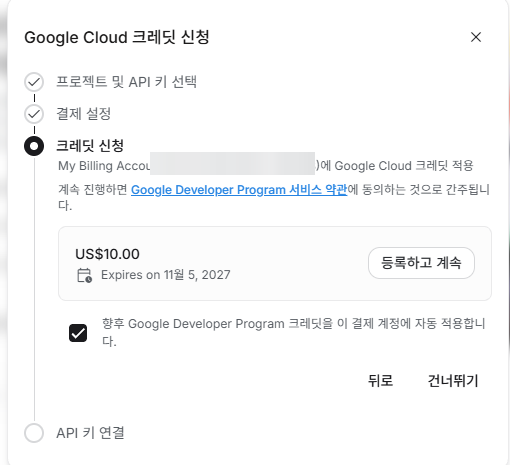
Start from the “Get US$10 API credit” button at the bottom left of Google AI Studio. The dialog runs four steps: pick a project and API key, set up billing (country, Google Cloud terms, payment method), claim the credit, and link the API key. On the claim step, “Register and continue” adds US$10 to the billing account; our screen showed an expiry of November 5, 2027. Leave the auto-apply box checked so future months land on the same account.
The “prepaid credits depleted” error
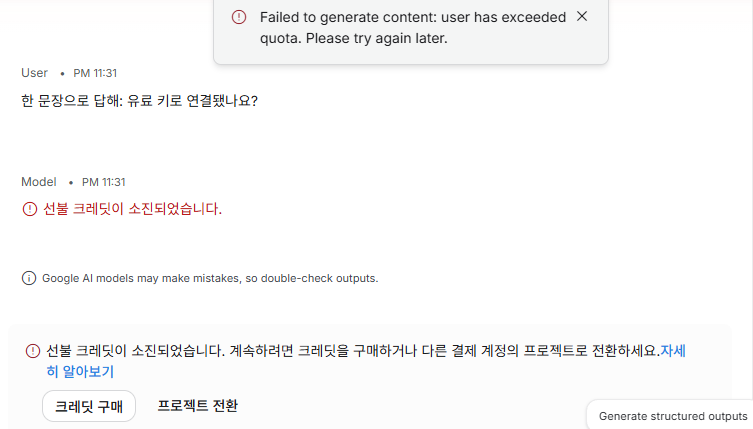
With the $10 claimed but nothing prepaid, a request with the paid key failed with “prepaid credits depleted” (quota exceeded). AI Studio’s billing documentation explains why: when the prepaid balance hits zero, API keys on linked projects stop and Google Cloud credits are no longer consumed. In other words, the monthly credit only works while the prepaid balance is above zero.
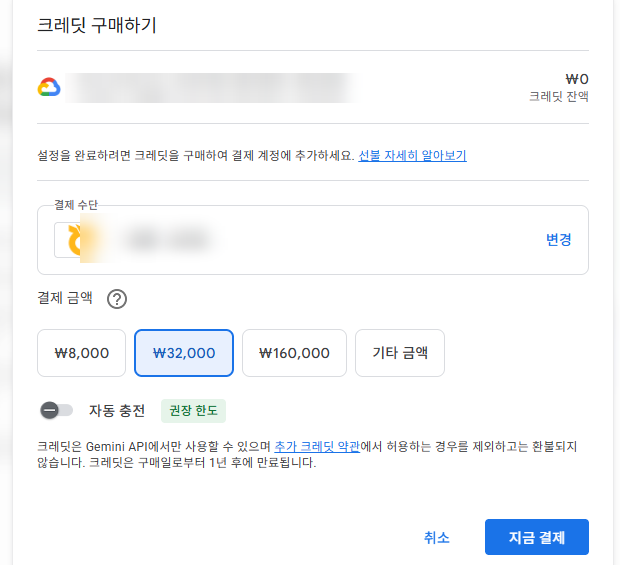
The purchase dialog preselects the middle option (₩32,000 in Korea). The minimum is lower: entering less than ₩8,000 shows “amount must be at least ₩8,000.” Google’s documentation gives the minimum as $5. After a ₩8,000 top-up, the same key answered normally. Per the on-screen terms, prepaid credit is for the Gemini API only, non-refundable, and expires one year after purchase. Auto-reload is off by default.
Two balances on one page
The AI Studio billing page shows the monthly credit at the top (“available GCP credit balance”) and the prepaid balance in the card below (“credit balance”). Before prepaying, the top read about ₩13,400 while the card read ₩0, which is exactly why requests failed.
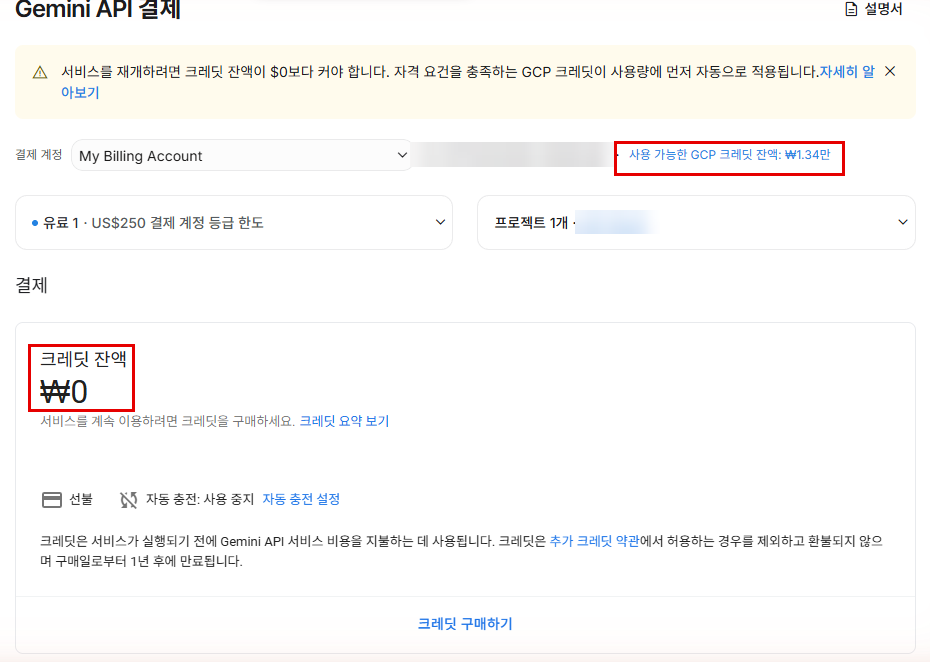
Which balance gets used first
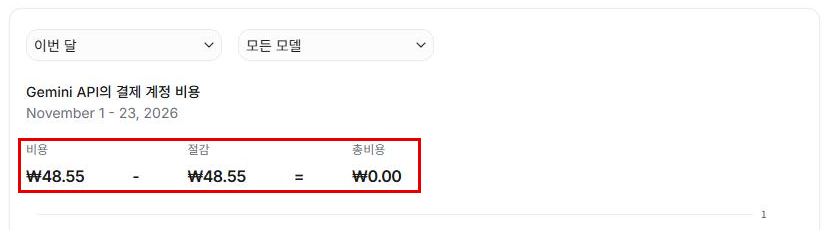
After a day of AI Studio prompts and a few API requests, the monthly credit dropped from ₩13,433 to ₩13,384 (₩49) and the ₩8,000 prepaid balance did not move. That matches the billing page note that eligible GCP credits are applied to usage first. The large “₩1.34만” figure at the top is rounded, so it did not change; the exact remaining amount is in the small text under the credit name. Further down, the page shows cost minus savings: ₩48.55 − ₩48.55 = ₩0.
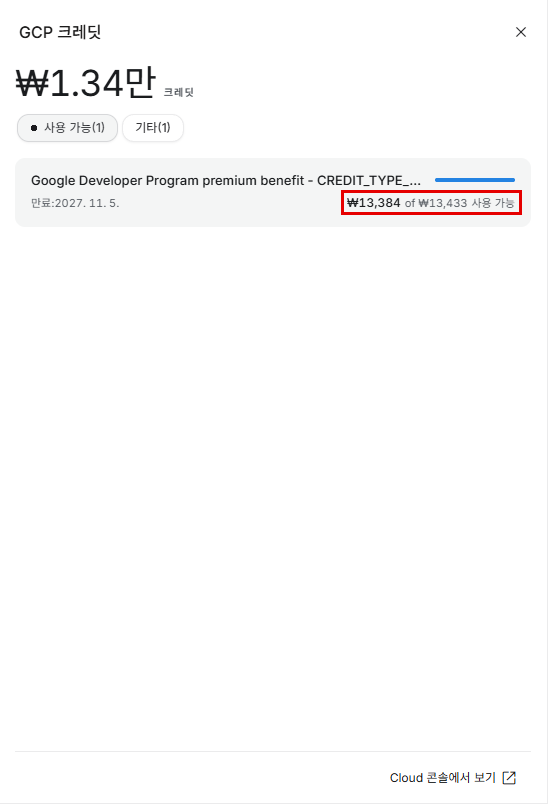
What a request costs
AI Studio’s pricing page (checked November 24, 2026) lists Gemini 3.8 Flash at $0.75 per million input tokens and $3.75 per million output tokens, and the output price includes thinking tokens. The same page says both prices double on January 1, 2027, to $1.50 and $7.50.
| Example | Tokens | Cost |
|---|---|---|
| One short AI Studio prompt, thinking High | – | ₩7 (shown on the Spend page) |
| Proofreading a ~3,000-character Korean text, thinking High | 1,780 in / 1,167 out / 5,869 thinking | about ₩37 (computed from list price) |
| Short classification request, thinking Low | 654 in / 160 out / 0 thinking | about ₩1.5 (computed from list price) |
Thinking tokens were about three quarters of the proofreading request, so the thinking level is the biggest cost lever. At current prices, one month’s ₩13,433 covers roughly 360 of those proofreading requests.
Keeping AI Studio itself free
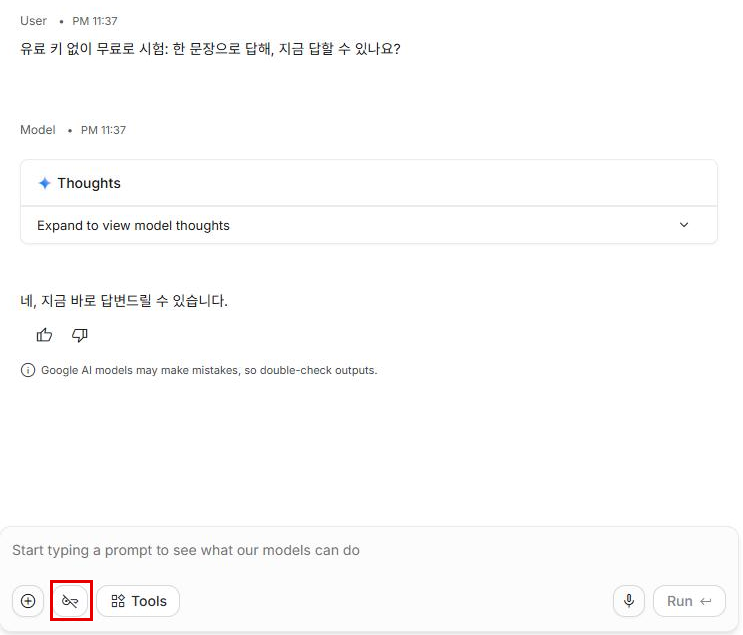
AI Studio’s billing docs state that using AI Studio stays free unless you link a paid API key. The credit claim flow links one in its last step, and from then on prompts in the AI Studio UI draw from your credit. The key icon under the prompt box shows the state: crossed out means no paid key. Unlinking it returns the UI to free use. The UI’s key dialog only accepts keys from billing-enabled projects; choosing a free-tier project key sends you to billing setup instead.
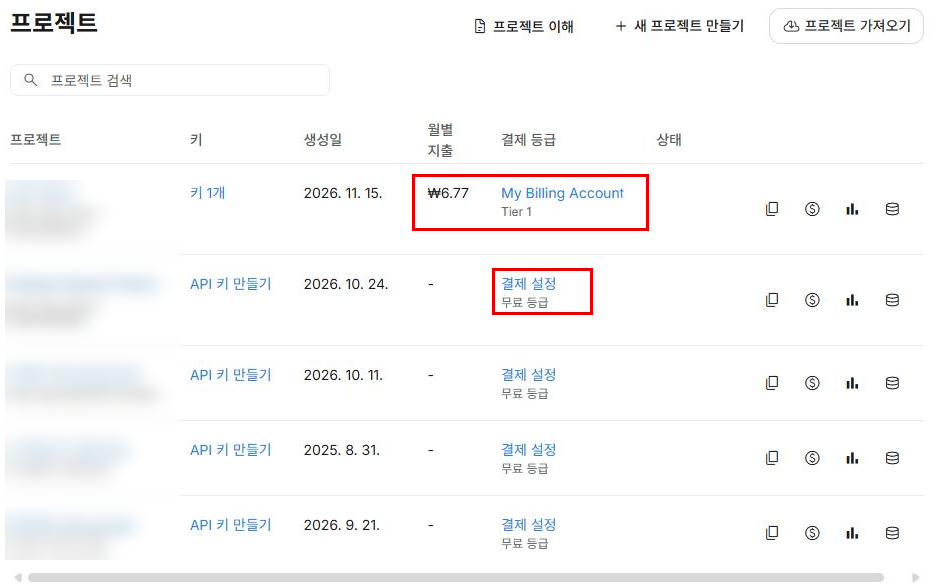
Paid or free, per project
The Projects page in AI Studio shows a billing tier for every project: Tier 1 with monthly spend for billed projects, “Set up billing / Free tier” for the rest. Free-tier input may be used to improve Google products, according to the pricing page. To take a project back to free, open Google Cloud console, Billing, Manage billing accounts, the Projects tab, then the actions menu and “Disable billing.”
Every credit, with balance and expiry, is listed under Billing, Credits in the Google Cloud console. Usage can take hours to appear there; AI Studio’s Spend page warns it can take more than 24 hours. Official references: AI Studio billing documentation and Google Developer Program benefits.
Checked November 23–24, 2026 on a Korea-region account. During our early-morning test window, a free-tier API key was repeatedly rejected with 503 (high demand); that may differ at other times.
Leave a Reply