This is part two of an old-laptop local LLM series with Ollama on Windows. Part one covered installing Ollama and running a first model. This part answers two practical questions: which model fits in your laptop’s memory, and is Ollama actually using your graphics card? Every number below was measured on the test laptop on November 23, 2026, with Ollama 0.40.17.
Test laptop
| CPU | Intel Core i7-10875H (8 cores, 16 threads) |
| RAM | 32GB DDR4-3200, dual channel |
| GPU | RTX 2070 Super Max-Q, 8GB, driver 566.36 (not used by Ollama in these tests, see below) |
| Ollama | 0.40.17, default 4,096-token context, thinking off |
How much RAM each model really uses
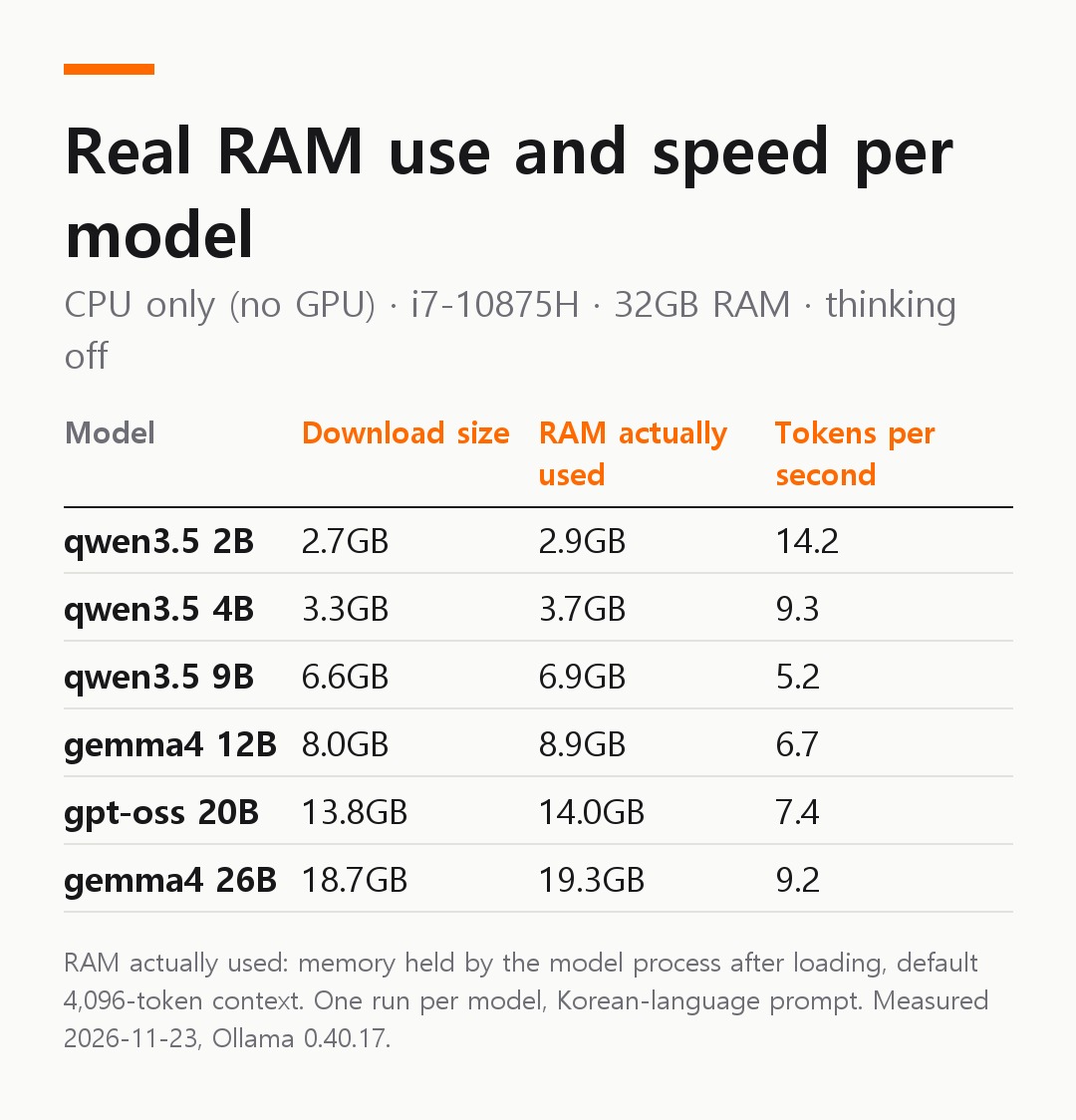
Each model was loaded on its own and asked the same short question. RAM use was read from the model process (llama-server) after the answer, not from Ollama’s own estimate.
| Model | Download size | RAM actually used | Tokens per second |
|---|---|---|---|
| qwen3.5:2b | 2.7GB | 2.9GB | 14.2 |
| qwen3.5:4b | 3.3GB | 3.7GB | 9.3 |
| qwen3.5:9b | 6.6GB | 6.9GB | 5.2 |
| gemma4:12b | 8.0GB | 8.9GB | 6.7 |
| gpt-oss:20b | 13.8GB | 14.0GB | 7.4 |
| gemma4:26b | 18.7GB | 19.3GB | 9.2 |
All six models used 0.2 to 0.9GB more than their download size at the default context length. Ollama’s documentation notes that a longer context needs more memory, so raising it will push these numbers up. Windows and open apps need their share too: with a browser and other apps open, loading gemma4:26b left 2.1GB of the 32GB free.
Picking a model by RAM (no GPU)
| Laptop RAM | Models that fit | Notes |
|---|---|---|
| 8GB | qwen3.5:2b | qwen3.5:4b (3.7GB) is tight once Windows takes its share |
| 16GB | gemma4:12b, qwen3.5:9b | Close large apps such as browsers |
| 32GB | gpt-oss:20b, gemma4:26b | gemma4:26b uses about 19.3GB, so keep other apps light |
These speeds come from an 8-core laptop CPU. Low-power office laptops have slower CPUs and memory, so expect lower numbers with the same amount of RAM.
Why the biggest model was one of the fastest
gemma4:26b is the largest model here, yet only the 2B and 4B models generated faster. Google’s model card describes it as a mixture-of-experts model that activates about 3.8B of its parameters per token, and OpenAI describes gpt-oss-20b as activating 3.6B of 21B. Dense models do not work this way and get slower as they get bigger. Mixture-of-experts models still need RAM for their full size.
Small models and answer language
The test prompt was in Korean. In these runs, the qwen3.5 4B and 9B answers sometimes mixed in Chinese words, while the two gemma4 models and gpt-oss:20b answered in Korean only. If you prompt in a language other than English or Chinese, check a few answers before settling on a small model.
Is Ollama using your GPU? Check with ollama ps
Load a model first, for example with a one-shot prompt: ollama run gemma4:12b --think=false "Say hello in one word." The model stays in memory for about five minutes after answering. Then run ollama ps in the same Command Prompt window.
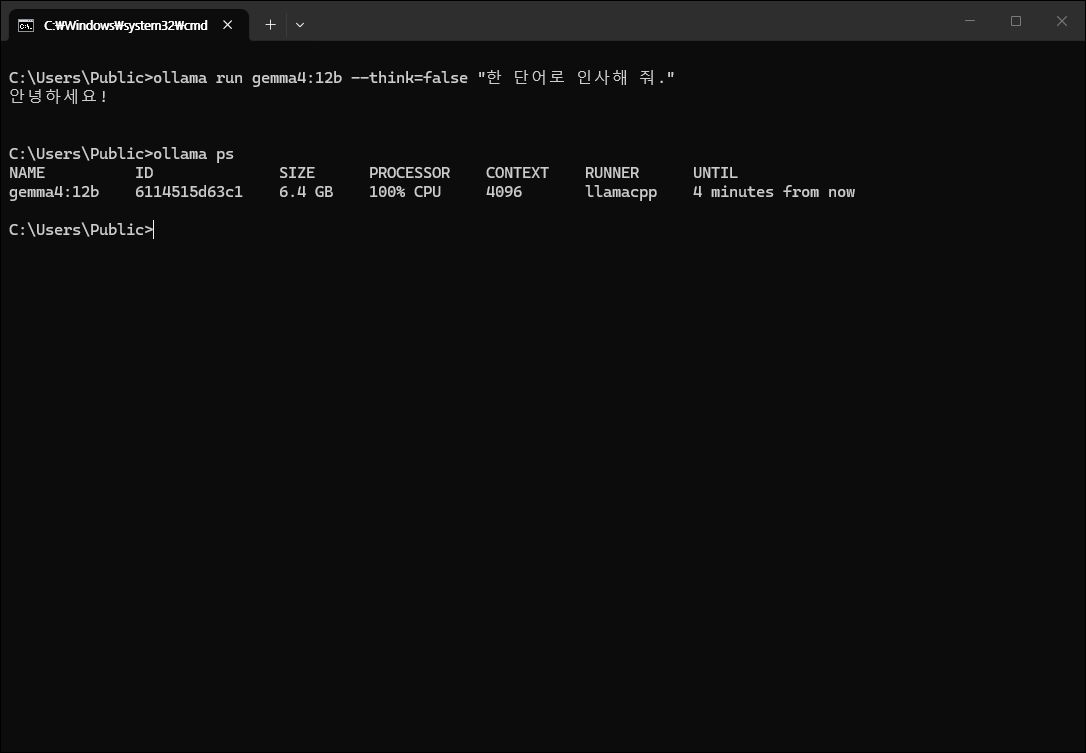
The PROCESSOR column is the one to read. According to Ollama’s FAQ, 100% GPU means the whole model is in graphics memory, 100% CPU means it is entirely in system RAM, and a split such as 48%/52% CPU/GPU means it is spread across both. 100% GPU is the fastest.
Treat the SIZE column as an estimate. On CPU, gemma4:26b showed 9.0GB in ollama ps while its process actually held 19.3GB, and gemma4:12b showed 6.4GB against 8.9GB in use.
Confirm with nvidia-smi or Task Manager
On NVIDIA cards, nvidia-smi --query-gpu=name,memory.used,memory.total,utilization.gpu --format=csv shows graphics memory in use. It is installed with the driver.
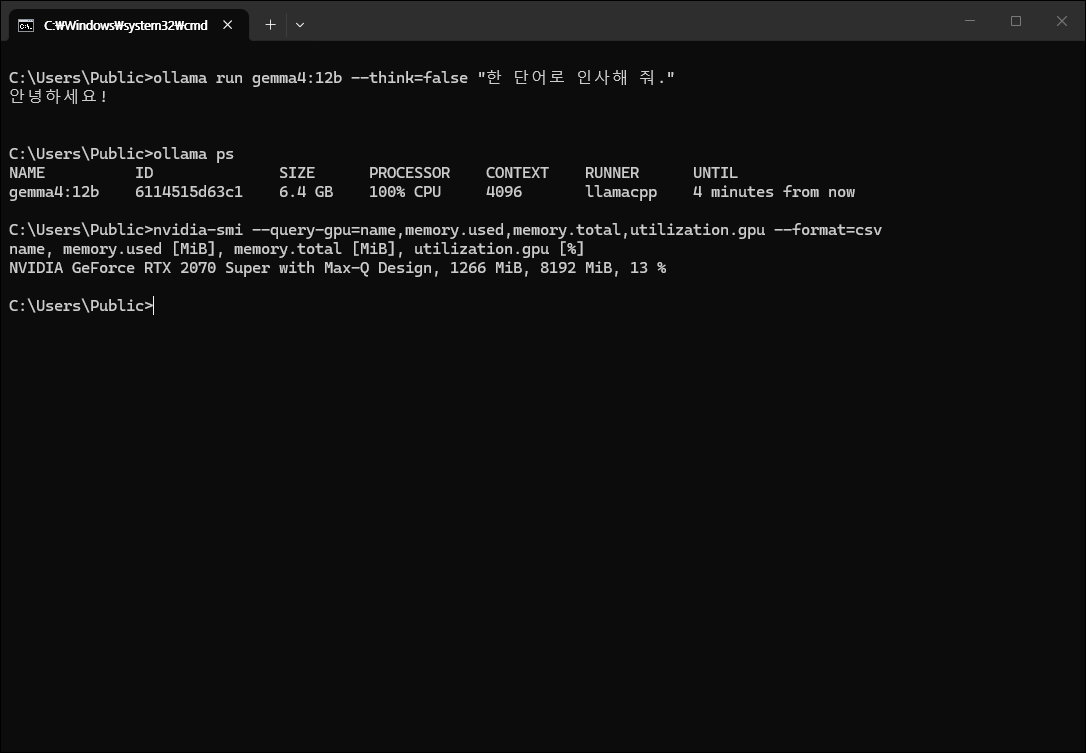
Only 1,266MiB of 8,192MiB was in use, about what the desktop and open apps take. A model in graphics memory would raise that by roughly its own size. Without the command line, open Task Manager (Ctrl + Shift + Esc), go to Performance, select the GPU, and watch Dedicated GPU memory while the model loads.
GPU present, but 100% CPU
Ollama’s documentation points to two common causes. On Windows, NVIDIA cards need driver 551.61 or newer. And a model larger than graphics memory spills the remainder into system RAM, which shows up as a CPU/GPU split.
Neither applied here. The driver was 566.36, the context was the default 4,096 tokens, and even qwen3.5:9b at 6.9GB, which fits in 8GB, ran at 100% CPU with nothing placed on the GPU. All six models showed 0GB in graphics memory. The cause turned out to be an outdated Windows component; the next part covers how it was found and fixed, then compares CPU and GPU speed on the same questions.
Sources: Ollama FAQ, Ollama on Windows, Ollama context length, Ollama model library.
Leave a Reply